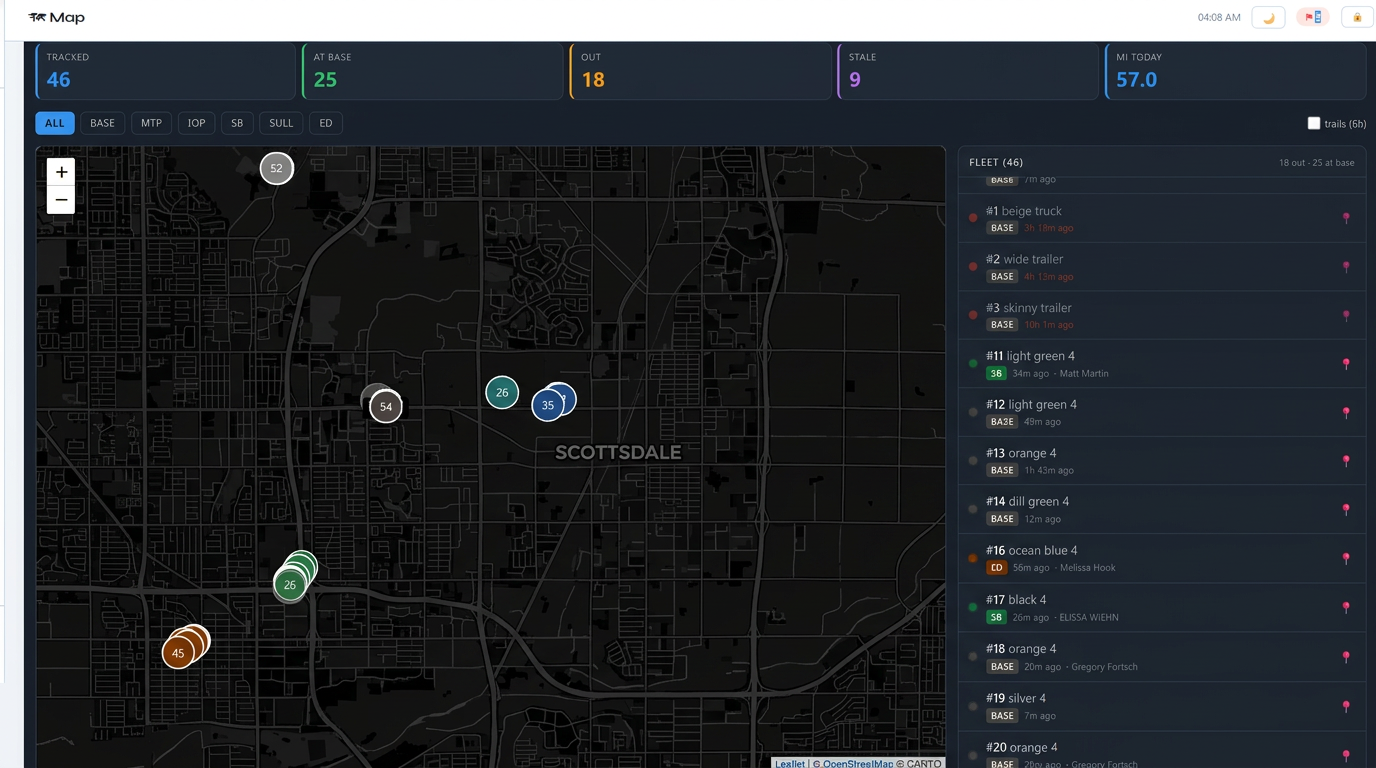
Live fleet map — every cart, every zone, updated in real time.
What's included
- Live map of every cart in your fleet
- Automatic zone classification for every island, beach, and neighborhood
- Stale-tag alerts when a cart stops reporting its location
- AirTag pairing guide — full fleet up in about an hour
- Works with standard Apple AirTags and Apple's Find My network. Tracking is $30 per AirTag plus $5 per tag per month.
Why AirTags beat traditional fleet GPS
Hardwired GPS trackers cost $200+ per cart plus a monthly subscription. Tracking uses an AirTag ($30 per AirTag plus $5 per tag per month). AirTags last over a year on a battery and use Apple's Find My network. For a 30-cart fleet, dedicated GPS units at $200+ each cost $6,000+ up front, plus their data plans. AirTags cost about $900, plus $150 a month for tracking.
Zone classification, not just dots on a map
Every location ping is automatically classified by zone, so you can answer 'how many carts are on the north end right now?' instantly. Useful for staging, recovery, and answering customer questions on the phone.
Stale tag alerts catch problems early
If a cart hasn't reported a location in 12 hours, you get an SMS or Telegram alert. That usually means a tag fell off, the battery died, or the cart is somewhere it shouldn't be — all things you want to know before the customer calls.
Built for
In the field
Golf cart rental markets
Why operators pick Golf Cart Rental Software
Built for the way coastal rentals actually run.
Personal onboarding on a call: your carts, zones, prices and drivers, plus a live walkthrough for your drivers.
Every part of live tracking came out of running a real coastal rental fleet — not a generic SaaS template repackaged for golf carts.
See the case studyHow real fleets put it to work
Most rental software was designed for warehouses, costume shops, or tools — not for fleets that move every morning, get rained on, and lose tags in the dunes. Golf Cart Rental Software started inside an actual coastal golf cart rental business, so the workflow matches the way a real operator already thinks: by zone, by truck, by driver shift, by cart condition. Nothing here is a generic feature bolted on to look good in a feature matrix — every piece exists because a fleet owner needed it on a Saturday morning in July.
Drivers stop asking “what's next?” because the route is on their phone. Nobody calls the yard to ask where cart #14 is, because the map already shows it. And nobody rebuilds a routing spreadsheet every morning, because the day's runs are already laid out by zone.
Switching from another booking tool or a stack of spreadsheets? We set it up with you — carts, zones, prices and drivers — and white-glove migration is included in onboarding.
Questions operators ask
See it running on your fleet
Personal onboarding included.